Carlo is a spending tracker and expense tracker app for iPhone and Android, built around one habit: recording each purchase as it happens, by photo, voice or text, in a few seconds. You always know where your money went, because you noticed it when it went.

A spending tracker that keeps you in the loop
Most spending trackers are built to do the work for you. They import your transactions, sort them into categories and draw the chart. A list like that tells you where the money went. But when you know you’ll record a purchase, you notice it while you’re making it.
Carlo makes a different bet: that a few seconds spent recording each purchase keep you close to your spending. So Carlo makes those seconds quick, instead of taking them away.
How it works
A purchase takes a few seconds, and it’s in your diary the moment you save it.
- Say it. “Treated Lisa to dinner at Kebab Wala, forty-two dollars.” Carlo fills in the amount, payee, category and note, and voice entry learns your payees as you go. Add a transaction by voice
- Type it. Tap +, then Enter manually. Add a transaction by hand
- Snap it. Snap a photo of the moment and the purchase becomes a memory in your Journal. Keep the receipt too, if you like; it stays with the transaction as a record. Attach a photo to a transaction


What Carlo shows you
- What you can spend today. Each budget category is a coin showing what you can still spend today and stay on track for the month. Understand your daily allowance
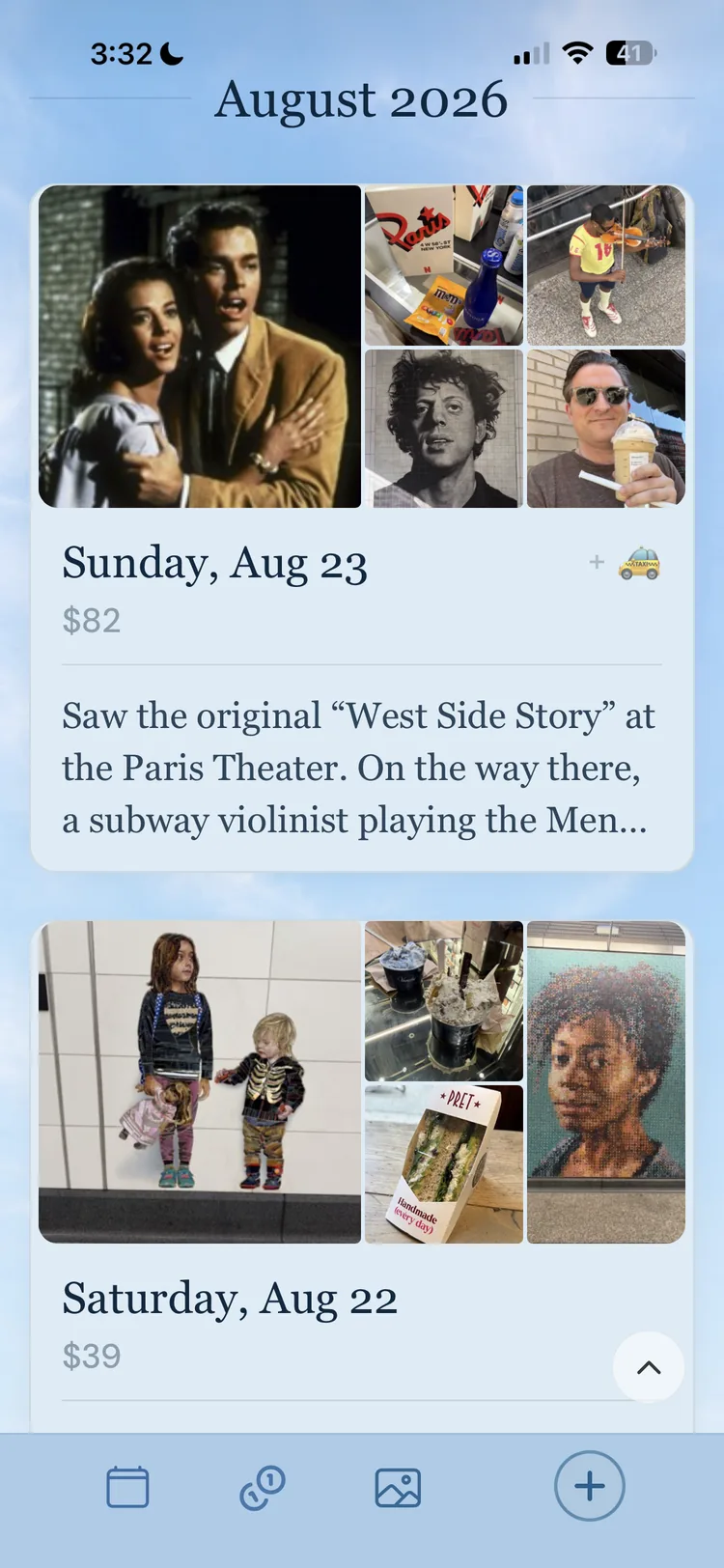
- Your diary. Every purchase lands in your Journal, one card per day, with its photos, captions and amounts together. Open a day and you can write about it.
- Your week, every Sunday. Carlo invites you to look back at the week: what you spent, what stood out, and a place to write down what you noticed. Close out your week
- Your month, closed out. At the end of the month, a closeout walks you through it and lets you send what you didn’t spend toward your goals. The monthly review
- Twelve months at a glance. The spending report shows a year of months side by side, for everything or for one category at a time. Read your spending report
- What a trip really cost. Group purchases into a project, like a weekend away, and see its total with the photos that went with it. See a project’s total
- A budget that fits your life. Monthly and annual categories, bills, goals, and charitable giving as a category of its own.
- Room to share. CoCarlo shared spaces, so one plan covers your whole household while everyone’s own Carlo stays private. CoCarlo
- A safety net, if you want one. Optional Bank Reminders connect read-only to your bank and ask you about money leaving your account, so a purchase you forgot to record doesn’t slip by. A reminder is a question, not an entry, and it’s off unless you turn it on. Available for banks in the United States. How Bank Reminders work
Your amounts, payees, notes, journal and photos are encrypted on your device, and Carlo never has the key to decrypt them. There are no ads, and your data is never sold. Exactly what Carlo can and can’t see
Planning a month without spending? How to run a no-spend challenge with Carlo.
Like a money diary, without the notebook
Some people keep a money diary in a notebook: every purchase written down by hand, with a line about what it was for. It works because you have to notice each one. Carlo is a money diary app built on the same idea, without the notebook. The amount, the place, a photo and a note take a few seconds, and scrolling back through a month reads like a journal rather than a statement. If you’ve been looking for a spending diary app, this is what Carlo was made to be.
Questions
Is Carlo free?
Carlo starts with a 30-day free trial that needs no credit card. After that it’s $9 a month or $79 a year, with everything included. If $79 a year is out of reach, Community pricing is $29 a year: no application and no reduced features. Your Carlo membership
Does Carlo work on Android?
Yes. Carlo is on iPhone and Android, from the App Store and Google Play.
Do I have to link my bank?
No. Recording your spending, your budget and your bills all work without a bank connection. Bank Reminders are optional: if you turn them on, the connection is read-only, and Carlo asks you about purchases you may have missed.
How is Carlo different from YNAB or Copilot?
YNAB starts with a budget: you give every dollar a job before you spend it. Carlo starts with what you actually spend: you log it first, then set your budgets from real numbers. Copilot pulls your transactions in from your bank automatically; with Carlo, you record each purchase yourself in a few seconds, and a bank connection is optional. Carlo vs. YNAB Carlo vs. Copilot Money